Friday, April 27, 2012

Facebook Check-Ins In Taiwan

Over half of the population in Taiwan have Facebook account! No wonder you can see all kinds of Facebook check-in incentives here!


Thursday, March 31, 2011

Meetups 411 - My First BlackBerry Playbook App

My first hand-on experience with BlackBerry tablet Playbook was back to the CES 2011, I was so amazed by its style form factor and the display performance! Therefore, I had decided to give the free Playbook offer a try. To get a free Playbook you would need to submit a qualified App by the end of March!

Currently, there are two types of developing tools for Playbook - Adobe AIR and BlackBerry WebWorks SDK for Tablet OS which is a HTML/JavaScript based tool kit. I do not have any experience with AIR, so the WebWorks was my only choice to develop the App. To speed up the process, I used the Sencha Touch 1.1 as the JavaScript framework which I used to write some Apps for Android before.


The subject I picked was to use the meetup.com API to create a search engine for upcoming meetup events in specified region(it can auto detect users location). "Meetups 411" is the name of the App.

This is the loading page -

A Google Map will display the markers showing the locations and meetups events in user's neighborhood -

The listing view of the events -

Fire the search function by clicking at the magnifier button -
There are three fields on the search panel :
  1. city or address - required
  2. state - optional
  3. topic - the topic you are interested in (optional)


To get more detail, click at the meetup group icon will bring you the the event web site -

This first release is just a very basic search tool for meetup events, and I did not have the real Playbook can tune the performance. Hopefully, I would have the chance to add some more functions on the next release.

Friday, December 31, 2010

Cross Domain Issues on CouchDB and Sencha Touch

Two of the best parts of the CouchDB are the REST HTTP API and the JSON-based data structure which makes it an ideal database solution for JavaScript-based Mobile App(WebApp). While trying to use the JavaScript-based framework( likes Sencha Touch) to work with CouchDB, the first issue is always the cross-domain Ajax problem. The solution is to use JSONP, however,  the JSONP can only fulfill the "GET" part, the "POST" part has to be achieved by a "proxy" solution which against the original simplicity philosophy - JavaScript + CouchDB only! If this is a read-only App then we can live with it by using JSONP, if data write back is necessary then we have to figure out a better way! Fortunately, the PhoneGap offers the solution, since the html files under PhoneGap are called by webkit with the file://protocol, the security policy does not apply!

On the previous post - Thanksgiving Weekend Crash Course - Android, Sencha Touch, PhoneGap and CouchDB I used the JSONP(Ext.util.JSONP.request) as the example, since it can be debugged under Chrome(or Firefox) then port to the Android. To test the Ajax function(Ext.Ajax.request) I have changed the codes as following
function makeAjaxRequest() {            
  Ext.Ajax.request({
    url: 'http://127.0.0.1:5984/facebook/_design/acdc/_list/basic/facebook/all',
    method: "GET",
    params: {},
    success: function(res, request) {
               if (res) {
                     result = Ext.util.JSON.decode(res.responseText);
                        arr = [];
                        for (i=0; i< result.rows.length; i++){
                          arr.push({id: result.rows[i].id, img: result.rows[i].img, game:  result.rows[i].game, lastName: result.rows[i].lastName, firstName: result.rows[i].firstName});
                        }
                        layout(arr);                      
                    }
                    else {
                        alert('There was an error retrieving the data.');
                    }
                },
                failure: function(res, request){
                 alert('Failed: ', res.responseText);
                }
            });
        }
      
  Ext.onReady(function() {
    makeAjaxRequest();
  });

and under CouchDB a new "list" named "basic" needs to be created to work with the Ajax call, this "basic" list function will generate a JSON object instead of a Javascript function codes -


Thanksgiving Weekend Crash Course - Android, Sencha Touch, PhoneGap and CouchDB

Happy New Year!


2011 - Year of Rabbit!

Tuesday, November 30, 2010

Thanksgiving Weekend Crash Course - Android, Sencha Touch, PhoneGap and CouchDB

The release of the free Sencha Touch 1.0 gave me the last push to start my own little Android project with PhoneGap and CouchDB all together. I did not have any experience with these three amigos before, it's sure a challenge for me! However, not until the Thanksgiving weekend I finally had time to start the experiment. Following is the screenshot of the result which taken from the Samsung Galaxy Tab and as you can see the CouchDB is on the top status bar!

The main reason I picked CouchDB is because I want the application can be operated offline and can be easily replicated with others servers/clients, I do have over 10 years experience with Lotus Notes, therefore, it won't be too difficult for me to pick up CouchDB since they are all document-based databases.

Following are the resources for this project, all FREE! Thank you open-source communities!
The CouchOne has free CouchDB hosting, I recommend everyone who want to try CouchDb should register one. I use it to create and update databases then replicate to local host and client devices.

The goal of this project was to display the Sencha list view on Android device with user names, user's icons and pop out the game the user paying on facebook if the arrow button pushed. All the users information will be stored on CouchDB and retrieve by JavaScript codes through Ajax.

Since I just wanted to build a very simple CouchDB database the only tool I used was "Futon" which came with the database itself. It is really not a very handy tool since any carriage return will cause an error, I just need to squeeze all codes together. I started with the database named "facebook" and create documents with fields - firstname, lastname and game (array)

To test the attachment function, each document I attached a 48x48 icon (png format) file.

A view named "all" was created under design document "_design/facebook" which was prepared for using under "foo" list.

A list named "foo" was created under design document "_design/acdc", the purpose of this list is to respond  the Ajax call from our main program index.html makeJSONPRequest function. It will respond back as a JavaScript code with all necessary data in JSON format.
 The URL of this list is http://127.0.0.1:5894/facebook/_design/acdc/_list/foo/facebook/all which will be called by our Ajax routine under index.html with a proper callback parameter, on this screen "undefine" is displayed in the beginning since it was just a test dump without assigning callback parameter.
Again! I did all my updates on CouchOne server first, then replicated with the database on my Android devices.

When running the Android application the data retrieving from CouchDB is from localhost(127.0.0.1) port 5894 which deems as the cross domain activity, therefore,  we will need to implement JSONP (JSON Padding) to make our Ajax tasks work. For a detail Sencha JSONP solution you can reference here.  However, the cross-domain security policy does not affect PhoneGap applications. Since the html files are called by webkit with the file:// protocol, the security policy does not apply. You still can use the Schena Ext.Ajax.request to get the same result. For the sample codes of Ajax call you can see here.

After finishing the database part, let's create a new Android project under Eclipse and name it "turkey" -

from the PhoneGap download earlier, find the following two files:
Android/phonegap-0.9.2.jar
Android/phonegap-0.9.2.js

In the root directory of the project you created in Eclipse, create two new directories:
/libs
/assets /www

Now copy
Android/phonegap-0.9.2.jar to /libs
Android/phonegap-0.9.2.js  to /assets/www

add phonegap-0.9.2.jar to build path

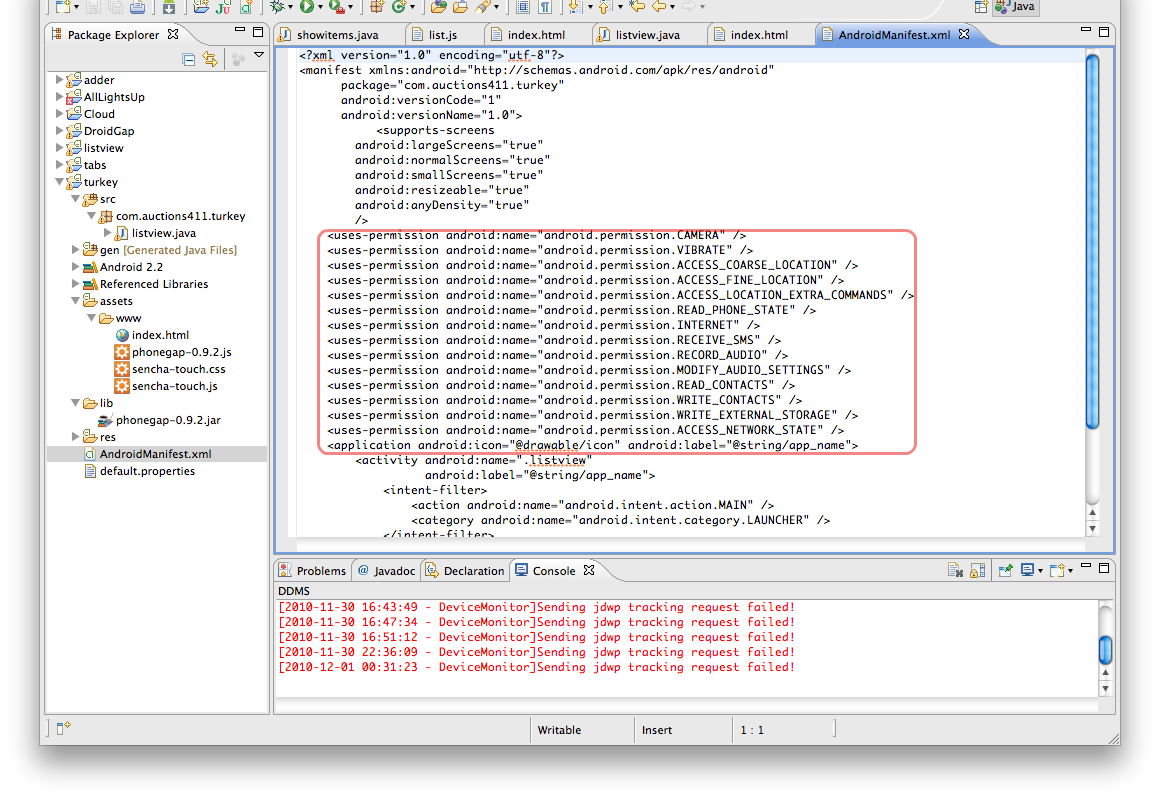
Modify the main java file and AndroidMainifest.xml as specified here.

From the unzipped download Sencha files, copy the sencha-touch-1.0/resource/css/sencha-touch.css and sencha-touch-1.0/sencha-touch.js to 'www" folder, (use sencha-touch-debug-w-comments.js if you need to debug under Sencha codes)

Sencha Touch sample codes have very detail examples, especially the kitchensink example. My goal is to create a nice looking List view, therefore I went for the code under sencha-touch-1.0/examples/list/ folder, to make easy to explain I moved the index.js codes into index.html and did necessary modifications.

Following is the source code of index.html, the function "makeJSONPRequest" is the codes I added to retrieve CouchDB facebook database data.
<!DOCTYPE html>
<html>
<head>
    <meta http-equiv="Content-Type" content="text/html; charset=utf-8"> 
    <title>Turkey Trouble</title>
    <link rel="stylesheet" href="sencha-touch.css" type="text/css">
    <script type="text/javascript" src="sencha-touch.js"></script>

</head>
<body>
<div id='acdc'></div>
   <script type="text/javascript">
var arr=[];
    
function layout(ar) {
  
  Ext.setup({
    tabletStartupScreen: 'tablet_startup.png',
    phoneStartupScreen: 'phone_startup.png',
    icon: 'icon.png',
    glossOnIcon: false,
    onReady : function() {
        Ext.regModel('Contact', {
            fields: ['firstName', 'lastName', 'game', 'id', 'img', 'game']
        });

        var groupingBase = {
            itemTpl: '<div class="contact2">{firstName} {lastName}</div><div><img src="http://127.0.0.1:5984/facebook/{id}/{img}"></div>',
            selModel: {
                mode: 'SINGLE',
                allowDeselect: true
            },
            grouped: true,
            indexBar: true,

            onItemDisclosure: {
                scope: 'test',
                handler: function(record, btn, index) {
                    alert( record.get('firstName') + ' play '+  record.get('game') );
                }
            },

            store: new Ext.data.Store({
                model: 'Contact',
                sorters: 'firstName',

                getGroupString : function(record) {
                    return record.get('firstName')[0];
                },

                data: ar
                            })
        };


        if (!Ext.is.Phone) {
            new Ext.List(Ext.apply(groupingBase, {
                floating: true,
                width: 350,
                height: 370,
                centered: true,
                modal: true,
                hideOnMaskTap: false
            })).show();
        }
        else {
            new Ext.List(Ext.apply(groupingBase, {
                fullscreen: true
            }));
        }
    }
  });
}

    function makeJSONPRequest() {
            
     Ext.util.JSONP.request({
                url: 'http://127.0.0.1:5984/facebook/_design/acdc/_list/foo/facebook/all',
                params: {},
                callbackKey: 'callback',
                callback: function(result) {
                   
                    if (result) {
                        arr = [];
                        for (i=0; i< result.rows.length; i++){
                          arr.push({id: result.rows[i].id, img: result.rows[i].img, game: result.rows[i].game, lastName: result.rows[i].lastName, firstName: result.rows[i].firstName});
                        }
                        layout(arr);                      
                    }
                    else {
                        alert('There was an error retrieving the data.');
                    }

                }
            });
        }
      
  Ext.onReady(function() {
    makeJSONPRequest();
  });
  
    </script>
</body>
</html>

The CouchDB _design/acdc file -
{
   "_id": "_design/acdc",
   "_rev": "47-c4692b5daf6ffa5b74461ea0591c1e5d",
   "language": "javascript",
   "lists": {
       "bar": "function(head, req) { var row; var firstrow=1; start({ 'headers': { 'Content-Type': 'application/javascript'} }); send(req.query.callback+'({\"rows\":['); while(row=getRow()){ if(firstrow==1){firstrow=0;} else {send(',');} send('{\"id\":\"' + row.id + '\",\"firstName\":\"' + row.value.firstName + '\",\"lastName\":\"' + row.value.lastName + '\"}');} send(']});');}",
       "foo": "function(head, req) { var row; var img=''; var game=''; var firstrow=1; start({ 'headers': { 'Content-Type': 'application/javascript'} }); send(req.query.callback+'({\"rows\":['); while(row=getRow()){ if(firstrow==1){firstrow=0;} else {send(',');} if(row.value.game){game=row.value.game[0];} if(row.value._attachments){for (n in row.value._attachments) { img=n;} }  send('{\"id\":\"' + row.id + '\",\"firstName\":\"' + row.value.firstName + '\",\"lastName\":\"' + row.value.lastName + '\",\"game\":\"' + game + '\",\"img\":\"' + img + '\"}');} send(']});');}"
   }
}
I installed the CouchDB on Mac and used Google Chrome to debug the JavaScript codes first, then ported the code to Eclipse, since I haven't figured out a way to install CouchDB on Android emulator, I had to run the program directly on devices to test. The following screenshot is the program running on EVO 4G -

When click at arrow it shows what game the person play -

Cross Domain Issues on CouchDB and Sencha Touch

Friday, October 15, 2010

WordPress E-Commerce Module PayPal Express Checkout with Coupon Code

WP e-Commerce is a very popular open-source shopping cart plug-in for WordPress, it supports most of the major PayPal payment options include Express Checkout, Web Site Payment STD and Web site payment Pro.

The plug-in supports the coupon discount function as well, however, the shopping cart only sends the total amount after discount to the PayPal, there is no discount coupon and discount price information on the PayPal activities report at all.
In order to let sellers get more information on the transaction involved the promotion coupons , I have modified one of the function - CallShortcutExpressCheckout which under /web-content/plugins/wp-e-commerce/merchants/paypal_certified.php

function CallShortcutExpressCheckout( $paymentAmount, $currencyCodeType, $paymentType, $returnURL, $cancelURL) {
//added $wpc_cart the shopping cart object itself
global $wpdb, $wpsc_cart;
//------------------------------------------------------------------------------------------------------------------------------------
// Construct the parameter string that describes the SetExpressCheckout API call in the shortcut implementation
//exit($cancelURL);
$purchase_log = $wpdb->get_row("SELECT `id`,`billing_region` FROM `".WPSC_TABLE_PURCHASE_LOGS."` WHERE `sessionid`= '".$wpdb->escape($_SESSION['paypalexpresssessionid']) ."' LIMIT 1", ARRAY_A) ;
$usersql = "SELECT `".WPSC_TABLE_SUBMITED_FORM_DATA."`.value, `".WPSC_TABLE_CHECKOUT_FORMS."`.`name`, `".WPSC_TABLE_CHECKOUT_FORMS."`.`unique_name` FROM `".WPSC_TABLE_CHECKOUT_FORMS."` LEFT JOIN `".WPSC_TABLE_SUBMITED_FORM_DATA."` ON `".WPSC_TABLE_CHECKOUT_FORMS."`.id = `".WPSC_TABLE_SUBMITED_FORM_DATA."`.`form_id` WHERE  `".WPSC_TABLE_SUBMITED_FORM_DATA."`.`log_id`=".$purchase_log['id']." ORDER BY `".WPSC_TABLE_CHECKOUT_FORMS."`.`order`";
//exit($usersql);
$userinfo = $wpdb->get_results($usersql, ARRAY_A);
//  print("
".print_r($usersql,true)."
"); // print("
".print_r($userinfo,true)."
"); $nvpstr="&Amt=". $paymentAmount; $nvpstr = $nvpstr . "&PAYMENTACTION=" . $paymentType; $nvpstr = $nvpstr . "&RETURNURL=" . $returnURL; $nvpstr = $nvpstr . "&CANCELURL=" . $cancelURL; $nvpstr = $nvpstr . "&CURRENCYCODE=" . $currencyCodeType; // added following 3 lines to send description to PayPal foreach($wpsc_cart->cart_items as $cart_item){ $nvpstr = $nvpstr . "&DESC=" . $cart_item->product_name . " w COUPON# " . $wpsc_cart->coupons_name . " DISCOUNT $" . "$wpsc_cart->coupons_amount"; } $data = array();
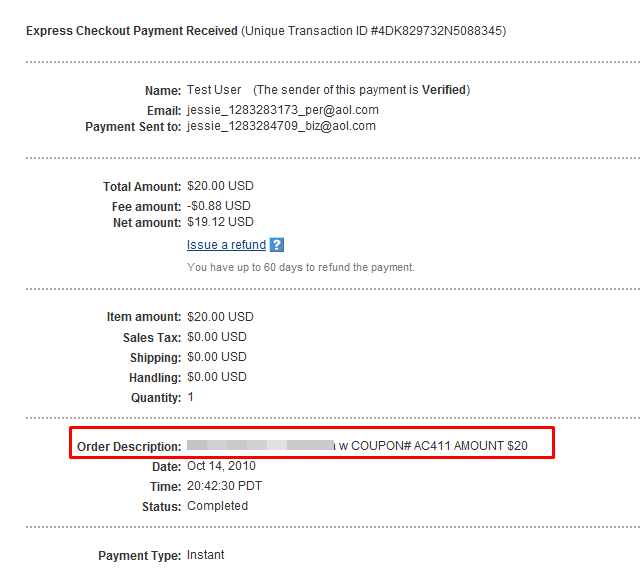
The shopping cart object $wpsc_cart needs to be announced as global, then add the coupon code number and discount total at DESC parameter which will be passed to PayPal API as payment description. The example below shown the applied coupon code and the discount amount on the PayPal transaction report.


For PayPal Web Payment Standard you will need to modify paypal_multiple.php as following
//$data['item_name_'.$i] = "Your Shopping Cart";
$itemdesc = "Discount " . $wpsc_cart->coupons_name . " $" . $wpsc_cart->coupons_amount . " for ";
foreach($wpsc_cart->cart_items as $cart_item){
  $itemdesc = $itemdesc . $cart_item->product_name . " ";
  }
$data['item_name_'.$i] = $itemdesc;

Monday, August 30, 2010

Our First Android Project Is a Game!!

snapshot #1 of All Lights Up in Android Market

snapshot #2 of All Lights Up in Android Market

Friend's son - Jonathan who's still in college wanted to learn some programming during his summer vacation, I gave him a Droid and Android SDK to play around. He never wrote Java before, and now.. after two months hard work, our first Android baby comes to the world! If you have an Android please don't forget to download it and give him some comments, just remember this came from a boy who didn't know how to write program two months ago! The challenges of the project was not only to get to know the UI of Android but to find a good algorithm to help player to solve the game if they click at "Hint" key. 
the opening screen
the menu screen
one of the 5x5 game screenshot
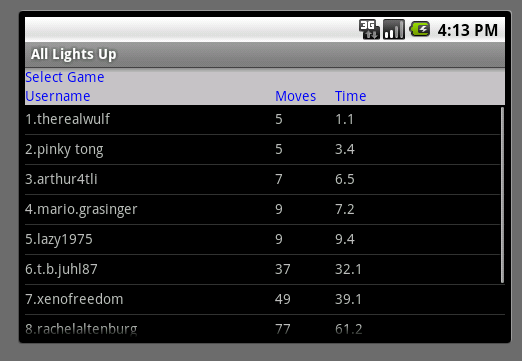
high-scores listing


The game can play on any Android device without internet connection, however, if you want to download more games, or see the high scores or upload your high scores then the internet connection is required. I have managed to implement the service from Google App Engine(GAE), it handles the service calls from the Android devices and keep all upload games and users' uploaded high scores. A web-based administration portal is offered to manage all games contents, upload activities and users preferences, this is done by GAE and Dojo JavaScript library.
activities management page


games management page